- Like
- SHARE
- Digg
- Del
- Tumblr
- VKontakte
- Flattr
- Buffer
- Love This
- Save
- Odnoklassniki
- Meneame
- Blogger
- Amazon
- Yahoo Mail
- Gmail
- AOL
- Newsvine
- HackerNews
- Evernote
- MySpace
- Mail.ru
- Viadeo
- Line
- Comments
- Yummly
- SMS
- Viber
- Telegram
- JOIN
- Skype
- Facebook Messenger
- Kakao
- LiveJournal
- Yammer
- Edgar
- Fintel
- Mix
- Instapaper
- Copy Link
The PC case is the decision that most first-time builders rush and most experienced builders spend the most time on. It determines which components you can use, how your cooling system performs, how difficult the build process actually is, and what the finished system looks like on your desk for the next several years. Getting it right at the beginning saves you from a cascade of compatibility problems and compromises that cascade through every other decision in the build.
Understanding what actually differentiates PC cases, beyond panel materials and RGB lighting, changes how you approach the selection.
Form Factor Is the Decision That Constrains Everything Else
The form factor of your case determines which motherboards fit, which CPU coolers clear the top panel, which GPU lengths are supported, and how many drives and radiators you can install. Every other case specification flows from the form factor decision, which is why it needs to come first rather than being treated as an afterthought after you have already chosen your components.
Mini-ITX cases are the smallest practical option for a complete desktop build. They accommodate Mini-ITX motherboards exclusively, which means a single PCIe slot, typically two RAM slots rather than four, and limited onboard connectivity compared to larger boards. The tradeoff is a significantly smaller footprint that works for compact setups, dorm rooms, and portable builds where size matters more than maximum expandability.
ATX cases support the full range of motherboard sizes from Mini-ITX through ATX, which gives you the flexibility to choose the motherboard that fits your needs rather than selecting it based on case constraints. The larger internal volume also means more room for cooling hardware, longer GPUs, more storage drives, and better cable routing that produces a cleaner finished build. The tradeoff is physical size that requires dedicated desk or floor space.
Airflow and Cooling Compatibility Are the Technical Decisions That Matter Most
A PC case that looks excellent but cannot adequately cool the hardware inside it is a bad case for that hardware regardless of its aesthetic qualities. The cooling decisions in a case selection involve fan mounting positions, radiator support for liquid cooling, CPU cooler height clearance, and the overall airflow path through the case.
Cases with front mesh panels allow significantly more intake airflow than those with solid front panels or tempered glass fronts, which restrict air intake and rely on fan pressure to pull air through limited gaps. For high-performance builds with demanding CPUs and GPUs, front mesh is a meaningful thermal advantage. For more modest builds where peak thermal performance matters less than aesthetics, the airflow tradeoff of a glass front may be acceptable.
Radiator compatibility is the other major cooling consideration for anyone planning a liquid-cooled build. A 360mm top mount radiator requires a case with a top panel long enough to accommodate three 120mm fans in a row plus the radiator header, and enough clearance above the motherboard for the radiator thickness. Checking radiator mounting positions and supported sizes before finalizing a case is essential for liquid cooling builds where this limitation is not always obvious from product photos.
What Actually Separates Premium Cases From Budget Options
The physical quality differences between a premium case and a budget case are immediately apparent during the build and become more apparent over time. Thick steel panels that do not flex under pressure, tempered glass that swings cleanly on hinges rather than removing completely for installation access, cable management channels with enough depth to route cables without fighting them, and fan mounts that accept fans without the plastic tabs bending or breaking under minor force are all quality dimensions that budget cases consistently sacrifice.
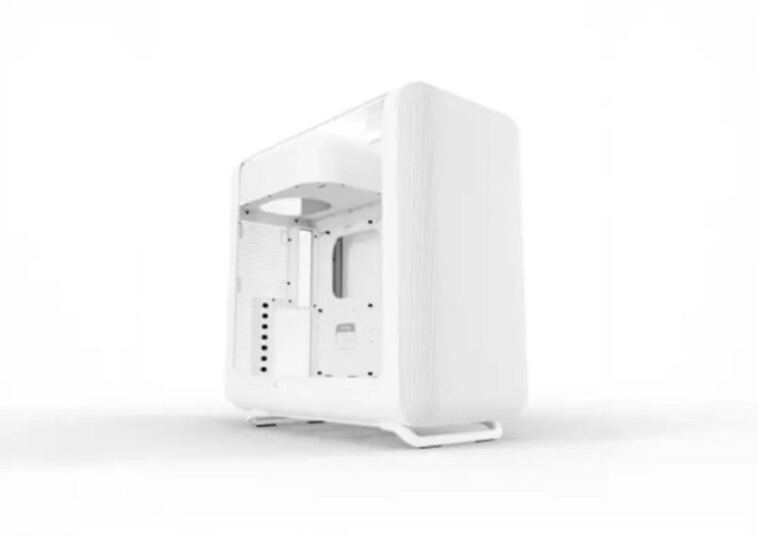
HYTE’s pc case lineup demonstrates what the premium end of the consumer case market looks like in practice, with designs that prioritize both the building experience and the finished aesthetic rather than treating them as competing priorities. The Y70’s three-piece panoramic glass configuration and dual-chamber layout are design decisions that directly affect how the build process works rather than purely cosmetic choices. Routing cables into the rear chamber before installing components means the front chamber where all the visible hardware lives stays clean without requiring hours of post-build cable hiding.
The Y60 and Y40 bring the same design philosophy to slightly smaller footprints and lower price points, while the Revolt 3 takes the ITX form factor in a direction that explicitly addresses portability with a built-in carry handle and a design that does not compromise on internal hardware support to achieve its compact dimensions.
The Panel Material Question
Tempered glass side panels have become standard in the mid-range and premium case market, and the quality variation between tempered glass implementations is significant enough to be worth understanding before selecting a case.
Glass thickness affects both the clarity of the panel and how it absorbs vibration from fans and drives inside the case. Thicker glass produces a better visual result and a noticeably more solid feel when the panel is installed. The hinge or latch mechanism that secures the glass panel affects both ease of access during the build and how securely the panel stays seated during transport or when the case is moved.
Cases that secure glass panels with thumbscrews at the corners provide more panel stability but require more effort to open for access. Cases with magnetic or tool-less latching mechanisms provide faster access but sometimes at the cost of panel rigidity, particularly in less expensive implementations where the magnet strength is insufficient to hold the panel firmly against vibration.
Limited Edition and Collaboration Cases
The custom PC case market has developed a distinct segment of collaboration and limited-edition cases that appeal to builders who want their system to reflect specific aesthetic interests beyond standard color options. HYTE has built a notable presence in this space with collaboration cases covering franchises including Gundam Wing, Final Fantasy XIV, Persona 3, and hololive VTubers, each bringing franchise-specific artwork and design elements to the Y70 and Y40 form factors rather than simply applying a decal to an existing case design.
These collaboration cases represent a more complete integration of the franchise aesthetic than aftermarket decoration typically achieves, and they have found an audience among builders for whom the visual statement of the case is as important as the hardware performance inside it.
The Practical Pre-Purchase Checklist
Before finalizing a case selection, the following specifications need to be verified against the components you are planning to install: motherboard form factor compatibility, maximum GPU length clearance, CPU cooler height clearance, radiator mounting positions and sizes if liquid cooling is planned, the number and size of drive bays for your storage configuration, PSU form factor support, and the number and placement of front panel USB ports.
Working through this list systematically before purchasing prevents the discovery after delivery that a component you already purchased does not fit the case you ordered, which is a more common and more frustrating outcome than it should be when the specifications are all available before purchase.